
Claude Premiere Pro Plugins: What Editors Should Look For
A straight Premiere Pro guide for editors who want to choose a Claude-based Premiere Pro plugin for real transcript-led editing, with the actual plugin, timeline, and cuts explained in plain English.

Claude Premiere Pro Plugins: What Editors Should Look For
AI-assisted workflows inside Premiere ProMost people asking about claude premiere pro plugin are not looking for another chatbot. They want to know whether Claude can put real cuts on a Premiere Pro timeline.
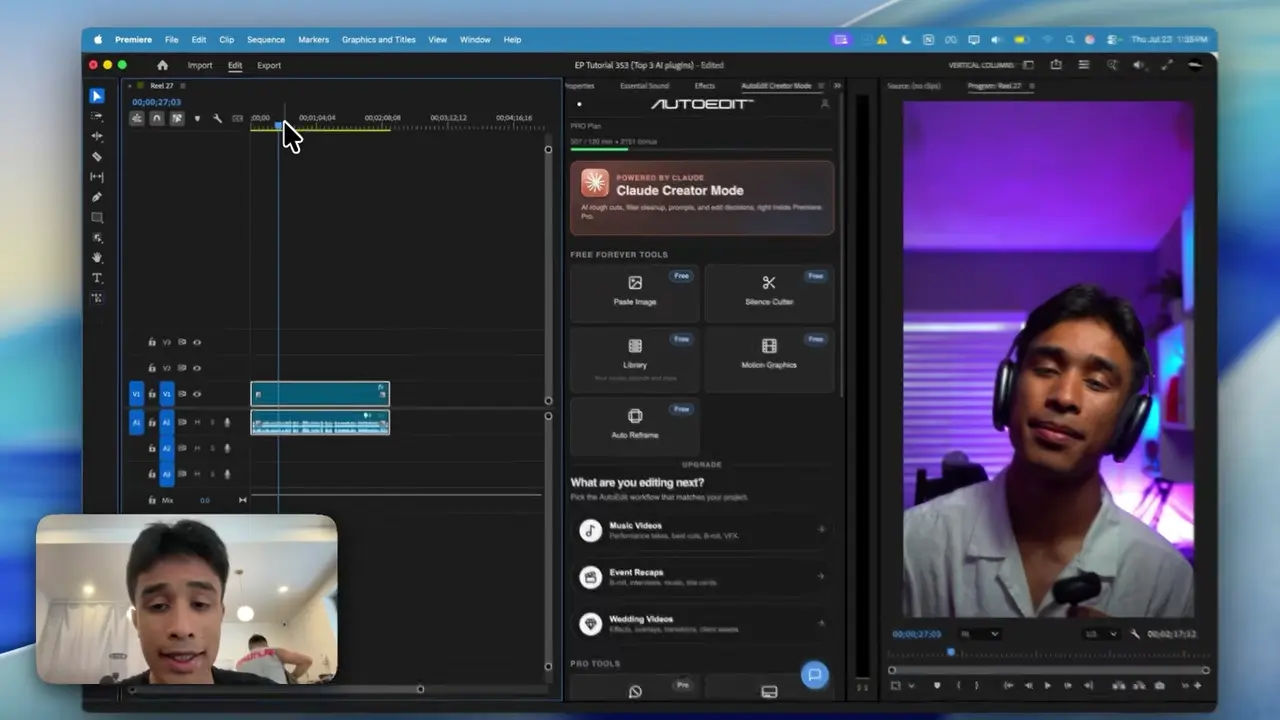
The easiest way to think about it is this: Claude is the handyman and Premiere Pro has the tools. AutoEdit brings Claude into Premiere, so it can read the transcript, help with the rough cut, and leave you with a normal timeline you can keep editing.
Quick Answer
The best Claude AI plugin for Premiere Pro should do more than open a chat box: it should analyze the selected footage, expose transcript decisions, and return an editable sequence. AutoEdit Creator Mode fits that workflow by combining Claude-powered Chat Edit with Premiere-native silence, caption, podcast, audio, and graphics tools.
What makes a useful Claude Premiere Pro plugin?
- It works on the selected Premiere Pro sequence.
- It exposes the transcript segments behind its decisions.
- It lets the editor preview or reverse proposed cuts.
- It returns an editable timeline instead of only written advice.
- It clearly separates rough-cut automation from final creative work.
Where does AutoEdit Creator Mode fit?
AutoEdit Creator Mode is a Premiere Pro extension for spoken creator content. Its Claude-powered Chat Edit workflow can reason over dialogue, identify repeated or weak takes, and help build a transcript-led rough cut.
The same extension also includes focused tools for silence removal, captions, podcast camera switching, audio cleanup, and motion-graphics starting points. Verify current plans on the official website.
Why is a plugin different from using Claude in a browser?
A browser conversation can suggest edit decisions, but it does not automatically know the active sequence or apply changes to it. A Claude extension for Premiere Pro connects analysis to the actual editing context and returns results the editor can inspect in the timeline.
Who is a Claude video editing plugin best for?
- YouTube creators with repeated takes
- Course and tutorial editors
- Solo and interview podcast editors
- UGC creators working from several hook reads
- Editors who want a transcript-led first assembly inside Premiere Pro
What should a Claude plugin not promise?
A responsible plugin should not promise a perfect unattended final edit. Claude cannot independently clear rights, verify every claim, finish detailed sound and color, or guarantee that the selected performance matches the client’s taste.
How should you test the plugin?
Run it on a duplicate of a real sequence with repeats and bad takes. Watch the cut, count what you have to fix, and compare that with doing the same rough cut by hand. The best Claude plugin is the one that leaves you with less boring cleanup and a timeline you can keep editing.
Tips
- Work on a duplicate sequence.
- Ask for one clear edit at a time.
- Watch the cut and count how much you actually have to fix.
Common mistakes
- Treating the rough draft like a finished edit.
- Using transcript tools on clips that need visual selects.
- Exporting without watching every automatic cut.
Try the workflow
Free tools for this article
Use the most relevant free tool for the task, then continue with the rest of your edit.
 Free Podcast Name GeneratorGenerate podcast-name directions that fit the topic, host, and audience.
Video walkthrough
How to Use Claude AI to Automatically Edit in Premiere Pro
Continue in Premiere Pro
Explore AutoEdit Creator Mode
Build an editable starting point, then keep creative control of the timeline.
Explore AutoEdit Creator ModeFrequently asked questions
What is a Claude Premiere Pro plugin?
A Claude Premiere Pro plugin connects Claude-powered analysis to an editing workflow so transcript decisions can become reviewable changes in a Premiere Pro sequence.
Is AutoEdit Creator Mode a Claude AI Premiere Pro plugin?
Yes. Creator Mode includes a Claude-powered Chat Edit workflow inside a broader set of Premiere Pro creator tools.
Is a Claude plugin better than copying a transcript into chat?
A plugin reduces manual export and import steps and can connect approved decisions to the active editing timeline. The quality still depends on footage and review.
Can the plugin edit non-English footage?
Yes. AutoEdit works with any spoken language, including Japanese, Spanish, Korean, Albanian, and Farsi. Read through the transcript once to fix names, slang, or brand terms.
Is the Claude plugin free?
Do not assume every feature or usage level is free. Verify the current download, included tools, credits, trials, and plans on AutoEditAI.net.
Sources and verification
External product claims were checked against these first-party sources.
How to Use Claude AI to Automatically Edit in Premiere Pro demonstrates Claude-powered editing inside a working Premiere Pro project.
AutoEdit Creator Mode provides the current Creator Mode download and product details.
Adobe Premiere Pro Text-Based Editing documents Adobe’s native transcript-based editing features.