
Connecting Claude to Premiere Pro Without Coding
A straight Premiere Pro guide for editors who want to connect Claude analysis to an active Premiere Pro editing workflow, with the actual plugin, timeline, and cuts explained in plain English.

Connecting Claude to Premiere Pro Without Coding
AI-assisted workflows inside Premiere ProMost people asking about how to connect claude to premiere pro are not looking for another chatbot. They want to know whether Claude can put real cuts on a Premiere Pro timeline.
The easiest way to think about it is this: Claude is the handyman and Premiere Pro has the tools. AutoEdit brings Claude into Premiere, so it can read the transcript, help with the rough cut, and leave you with a normal timeline you can keep editing.
Quick Answer
To connect Claude to Premiere Pro without building a custom connector, install AutoEdit Creator Mode, open it from Window > Extensions, and use its Claude-powered Chat Edit workflow on a duplicate sequence. The integration handles transcript analysis and turns approved Claude decisions into editable cuts within the Premiere Pro timeline.
What does “connect Claude to Premiere Pro” mean?
Claude is the handyman and Premiere Pro has the tools. Connecting them means Claude can read the transcript, decide which spoken sections to keep or cut, and use the plugin to put those changes on your Premiere Pro timeline.
Three ways people try to use Claude with Premiere Pro
- Use AutoEdit Creator Mode inside Premiere Pro.
- Export transcripts and timeline files, send them through Claude, then import the cut again.
- Ask Claude for written edit notes and make every cut by hand.
How to connect Claude through Creator Mode
1. Install Creator Mode
Use the current Mac or Windows download from the official AutoEdit website.
2. Open the extension
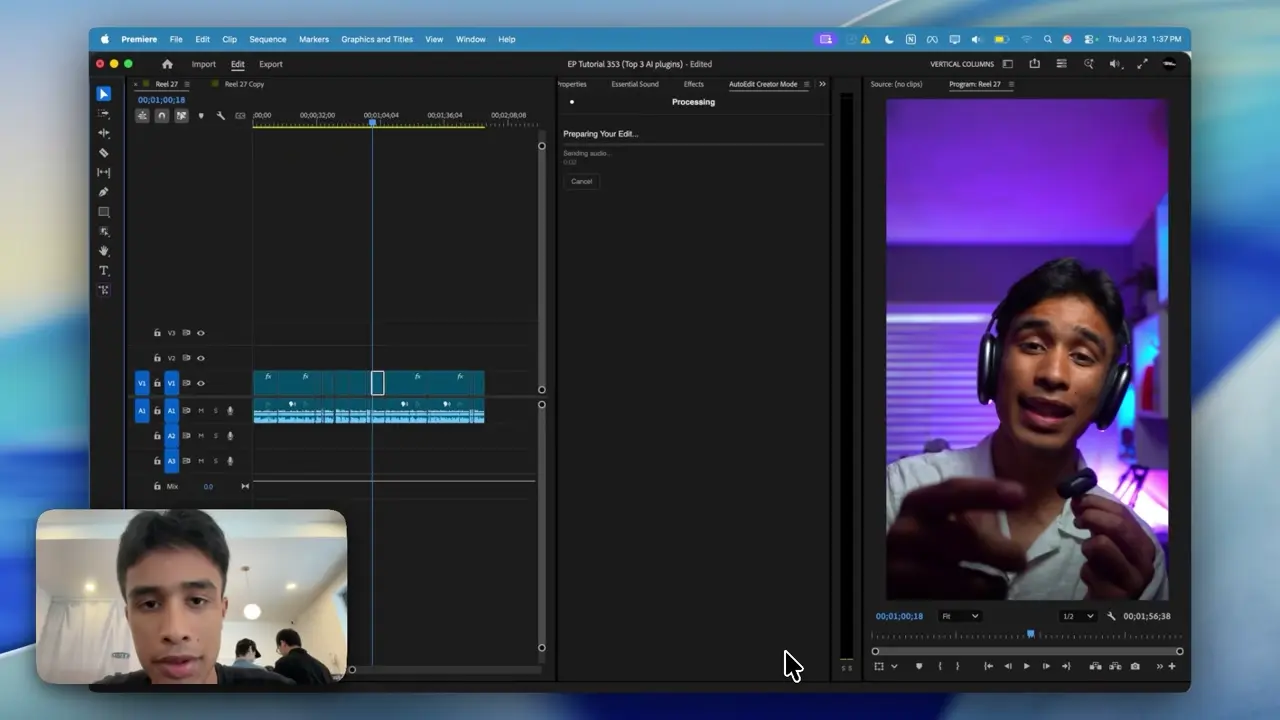
In Premiere Pro, choose Window, Extensions, then AutoEdit Creator Mode.
3. Prepare the sequence
Synchronize media, confirm audible dialogue, and duplicate the working timeline.
4. Start Chat Edit
Choose a narrow transcript task and let the plugin analyze the spoken footage.
5. Approve decisions
Preview the proposed segments before applying them to the duplicate sequence.
What does Claude actually read?
Claude reads the audio transcript and the instructions you give it. It is good at finding repeated sentences, filler words, restarts, and sections about a specific topic. It does not watch every visual take like an editor, so you still choose the better-looking shot.
What if the integration does not open?
- Record the Premiere Pro, plugin, and operating-system versions.
- Restart Premiere Pro after installation.
- Check Window > Extensions for the panel.
- Distinguish installation errors from credential errors.
- Contact support with the exact message and system details.
How do you verify the connection works?
Run a one-minute duplicate sequence. Confirm that transcript segments can be previewed, approved changes appear on the correct timeline, and linked media stays synchronized. Only then move to a full project.
Tips
- Work on a duplicate sequence.
- Ask for one clear edit at a time.
- Watch the cut and count how much you actually have to fix.
Common mistakes
- Treating the rough draft like a finished edit.
- Using transcript tools on clips that need visual selects.
- Exporting without watching every automatic cut.
Try the workflow
Free tools for this article
Use the most relevant free tool for the task, then continue with the rest of your edit.
Video walkthrough
How to Use Claude AI to Automatically Edit in Premiere Pro
Continue in Premiere Pro
Explore AutoEdit Creator Mode
Build an editable starting point, then keep creative control of the timeline.
Explore AutoEdit Creator ModeFrequently asked questions
Can Claude connect directly to Premiere Pro?
Claude needs an integration layer to work with a Premiere Pro editing context. AutoEdit Creator Mode provides that layer for transcript-led editing.
Do I need to build a custom Claude connector?
No. AutoEdit brings Claude into Premiere Pro for you, so you do not have to export transcripts, move timeline files around, or build a custom connector.
Where does Creator Mode appear in Premiere Pro?
After installation, open Premiere Pro and look under Window > Extensions for AutoEdit Creator Mode.
Does the integration upload the full video?
Claude Creator Mode analyzes the audio and transcript for the edit. The 8K or 4K video stays part of your Premiere Pro project while the plugin works from the spoken content.
Can I test the connection safely?
Yes. Duplicate the sequence and run one minute with real dialogue, repeats, and bad takes. Keep the original assembly untouched.
Sources and verification
External product claims were checked against these first-party sources.
How to Use Claude AI to Automatically Edit in Premiere Pro demonstrates Claude-powered editing inside a working Premiere Pro project.
AutoEdit Creator Mode provides the current Creator Mode download and product details.
Adobe Premiere Pro Text-Based Editing documents Adobe’s native transcript-based editing features.