
Automatic Video Editors That Keep You in Premiere Pro
A straight Premiere Pro guide for editors who want to choose an automatic editor that works with a Premiere Pro timeline, with the actual plugin, timeline, and cuts explained in plain English.

Automatic Video Editors That Keep You in Premiere Pro
AI-assisted workflows inside Premiere ProMost people asking about automatic video editor are not looking for another chatbot. They want to know whether Claude can put real cuts on a Premiere Pro timeline.
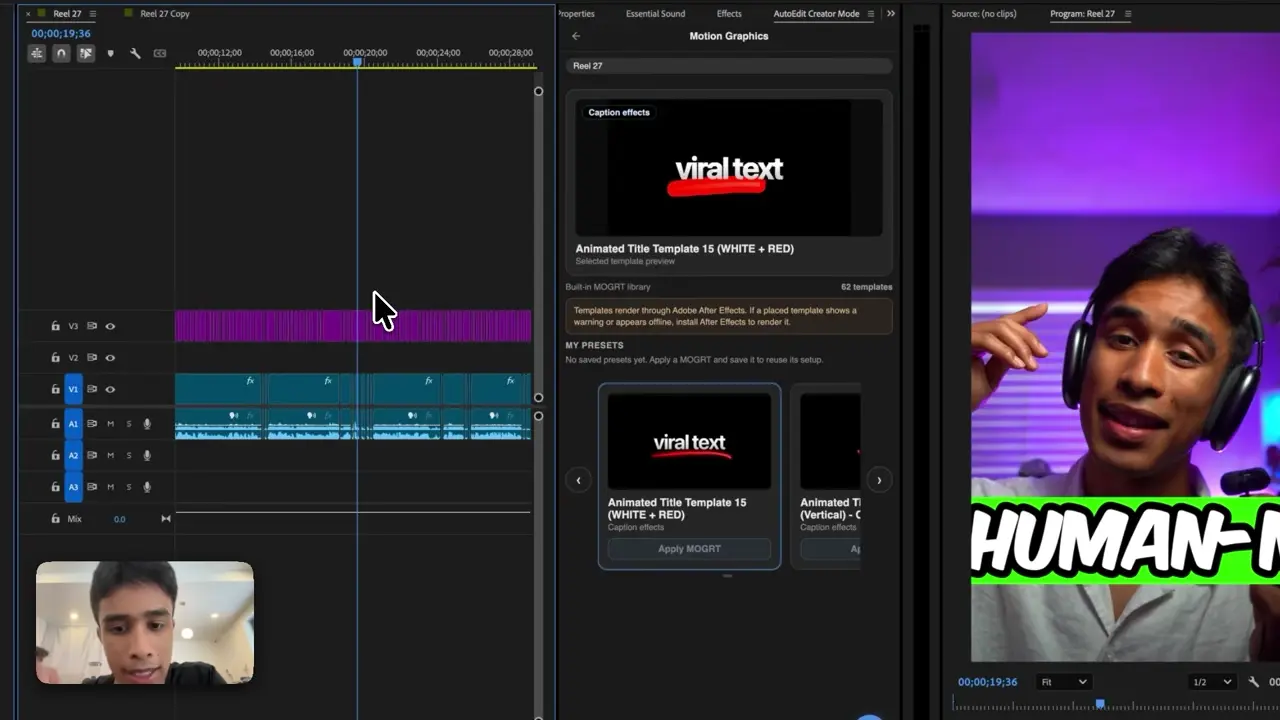
The easiest way to think about it is this: Claude is the handyman and Premiere Pro has the tools. AutoEdit brings Claude into Premiere, so it can read the transcript, help with the rough cut, and leave you with a normal timeline you can keep editing.
September 2026 update: the free Premiere Pro plugin walkthrough below demonstrates current tools for effect search, image imports, silence cleanup, and editable first-pass workflows. Check each tool against the specific job in this guide.
Quick Answer
The best automatic video editor for Premiere Pro depends on what you shot. AutoEdit has separate modes for talking-head content, music videos, and event recaps. Each mode builds an editable first draft in Premiere, so you can check the cuts, change the timeline, and finish the video yourself.
What does an automatic video editor actually do?
An automatic video editor can cut dead air, find repeated takes, sync performances, make selects, or put a first rough draft on the timeline. The right tool depends on whether you shot a talking head, podcast, music video, or event recap.
Which automatic editor categories exist?
- Browser editors that create simplified exports
- Generative tools that create new footage
- Premiere Pro plugins that edit an existing timeline
- Single-job tools for silence, captions, or reframing
- Editing modes made for creator, music, or event footage
Why keep automatic video editing inside Premiere Pro?
Premiere-native output preserves the bins, tracks, source media, effects, and finishing environment already used by the editor. This matters when the automatic result is a rough cut that will receive substantial human refinement.
How does AutoEdit approach automatic editing?
AutoEdit separates footage types into dedicated workflows. Creator Mode centers on transcripts and spoken content; Music Video Mode centers on songs, performances, beats, and B-roll; Event Recap Mode centers on event footage and highlights.
How do you choose the right automatic editor?
- Match the tool to the footage structure.
- Confirm host and operating-system compatibility.
- Require editable output.
- Test decision transparency and reversibility.
- Verify current pricing and usage directly.
- Compare total time through final review.
Will an automatic editor finish the entire video?
An automatic editor can create a useful first assembly, but story, taste, performance, sound, color, client feedback, rights, and final delivery still require human judgment.
Tips
- Work on a duplicate sequence.
- Ask for one clear edit at a time.
- Watch the cut and count how much you actually have to fix.
Common mistakes
- Treating the rough draft like a finished edit.
- Using transcript tools on clips that need visual selects.
- Exporting without watching every automatic cut.
Try the workflow
Free tools for this article
Use the most relevant free tool for the task, then continue with the rest of your edit.
Video walkthrough
How to Use Claude AI to Automatically Edit in Premiere Pro
6 Free Premiere Pro Plugins That Actually Save You Time
Continue in Premiere Pro
Explore AutoEdit Creator Mode
Build an editable starting point, then keep creative control of the timeline.
Explore AutoEdit Creator ModeFrequently asked questions
What is the best automatic video editor for Premiere Pro?
The best choice matches the footage. AutoEdit provides separate Premiere Pro workflows for creator content, music videos, and event recaps.
Is an automatic editor the same as a browser video maker?
No. A Premiere Pro automatic editor works within an existing professional timeline; browser makers often use a separate simplified workflow.
Can an auto video editor keep my timeline editable?
Yes. AutoEdit returns an editable Premiere Pro sequence, so you can move cuts, restore shots, and finish the timeline normally.
Does AutoEdit replace professional editors?
No. AutoEdit creates starting points and handles repetitive setup while editors make and verify final creative decisions.
How should I test an automatic editor?
Duplicate a real sequence, run the tool on five minutes of footage, and count how long the first draft and your corrections take.
Sources and verification
External product claims were checked against these first-party sources.
How to Use Claude AI to Automatically Edit in Premiere Pro demonstrates Claude-powered editing inside a working Premiere Pro project.
AutoEdit Creator Mode provides the current Creator Mode download and product details.
Adobe Premiere Pro Text-Based Editing documents Adobe’s native transcript-based editing features.