
How to Test AutoEdit Creator Mode on a MacBook Air M1
A straight Premiere Pro tutorial for solo creators editing on Apple silicon laptops dealing with an extension that does not appear or open as expected, with the exact setup, what the plugin does, and what you still need to check.

How to Test AutoEdit Creator Mode on a MacBook Air M1
AI-assisted workflows inside Premiere ProIf you are dealing with an extension that does not appear or open as expected, you probably do not need another AI chat giving you edit notes. You need something that can use Premiere Pro and put an actual cut on the timeline.
Claude is like the handyman; Premiere Pro has the tools. AutoEdit brings Claude into Premiere, so it can handle the boring setup and give you something to edit instead of an empty timeline.
Quick Answer
AutoEdit Creator Mode is a Premiere Pro AI editing plugin that helps solo creators editing on Apple silicon laptops deal with an extension that does not appear or open as expected. Use Creator Mode installation to get a controlled compatibility check without risking the main project, then watch the cut and change anything you do not like. It gives you a rough draft; you still finish the edit.
Who should use this?
This is for solo creators editing on Apple silicon laptops who are tired of an extension that does not appear or open as expected. The plugin helps you get a controlled compatibility check without risking the main project without leaving Premiere Pro.
It is a starting point, not the final edit. You still choose the best takes, change the pacing, add B-roll, clean up the sound, color the footage, and make the creative calls.
Set up the timeline first
- Confirm the current Premiere Pro version.
- Install the correct Mac download.
- Restart Premiere Pro and check Window > Extensions.
How to use Creator Mode installation in Premiere Pro
1. Duplicate the sequence
Keep the raw assembly untouched so you can compare the new cut or bring a shot back.
2. Open Creator Mode
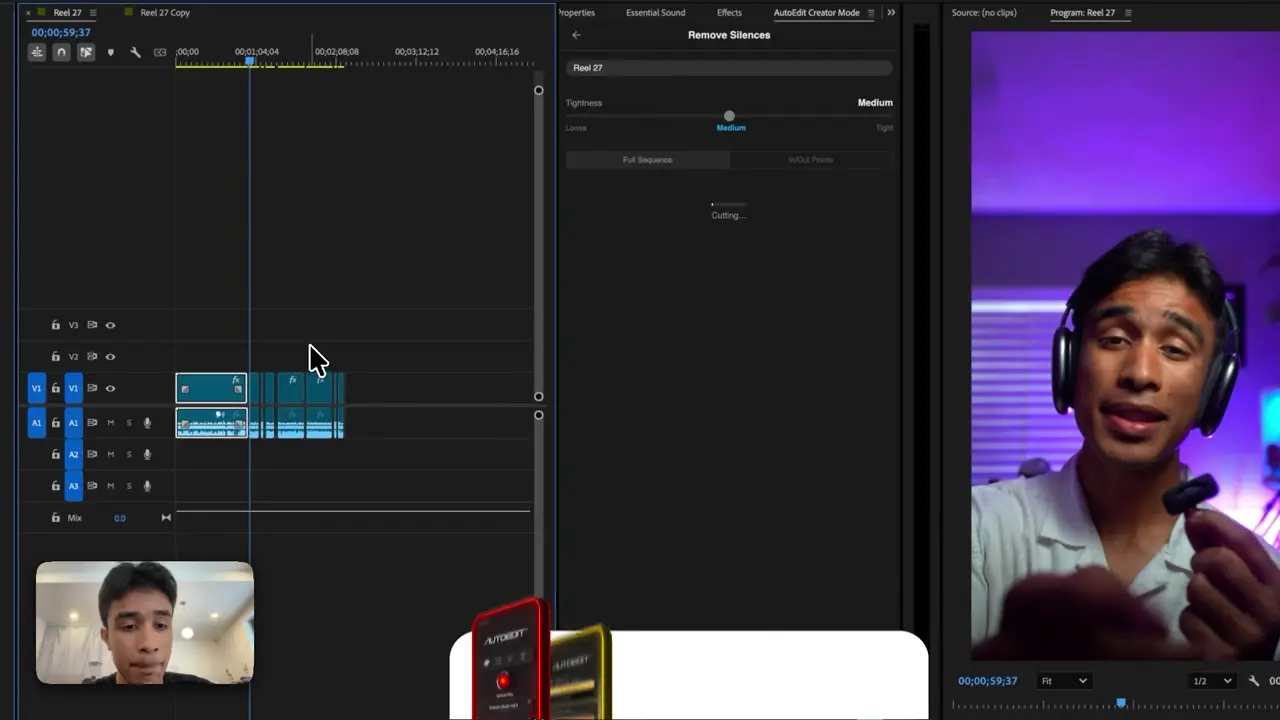
In Premiere Pro, open Window, choose Extensions, and select AutoEdit Creator Mode as shown in the tutorial.
3. Run Creator Mode installation
Use it for an extension that does not appear or open as expected. Do one job first so you can see exactly what changed on the timeline.
4. Watch the cut
Check the takes, the sentence, the timing, and any linked clips. Put back anything the edit needs.
5. Finish the video
Now do the editor part: pacing, B-roll, graphics, music, sound, color, revisions, and export.
What should you check after it runs?
- Plugin build and Premiere version mismatch
- A panel opening off-screen
- Invalid credentials versus installation failure
Why is the extension not opening on an M1 MacBook Air?
On an M1 MacBook Air, first note your macOS version, Premiere Pro version, plugin version, and the exact error. Restart Premiere once. If it still will not open, send those details to support so they can diagnose the right issue.
What do you still have to edit?
AutoEdit does not pick every best take, nail every pause, finish the color, mix the sound, or handle client revisions for you. It does the repetitive setup so you can spend more time actually editing.
Watch the whole sequence before you export. The point is to get a useful rough cut on the timeline faster, not to skip the editor.
Try it on one real section
Follow the tutorial below, download Creator Mode, and run it on a duplicate of one real section from your video. If the first rough draft saves you time, use the same setup on the rest of the cut.
Tips
- Start with one minute of real footage.
- Keep the new cut on a clearly named duplicate sequence.
- Watch every important cut at normal speed.
Common mistakes
- Running every tool before checking the first cut.
- Assuming a transcript can judge the visual take for you.
- Exporting without watching the whole video.
Try the workflow
Free tools for this article
Use the most relevant free tool for the task, then continue with the rest of your edit.
Video walkthrough
How to Use Claude AI to Automatically Edit in Premiere Pro
Continue in Premiere Pro
Explore AutoEdit Creator Mode
Build an editable starting point, then keep creative control of the timeline.
Explore AutoEdit Creator ModeFrequently asked questions
Can AutoEdit handle an extension that does not appear or open as expected?
Yes. Creator Mode can make the first cut for an extension that does not appear or open as expected and put it on an editable Premiere Pro timeline. Watch the result, change the takes or timing you do not like, and finish the video normally.
Why is the extension not opening on an M1 MacBook Air?
On an M1 MacBook Air, first note your macOS version, Premiere Pro version, plugin version, and the exact error. Restart Premiere once. If it still will not open, send those details to support so they can diagnose the right issue.
Should I run AutoEdit on my original Premiere Pro sequence?
Use a duplicate sequence. A separate automated version makes it easy to compare changes, restore a missed line, and keep the untouched assembly available.
Does AutoEdit replace a video editor?
No. AutoEdit handles repetitive setup and gives you a rough cut. You still make the creative decisions, deal with revisions, color the footage, finish the sound, and deliver the video.
Where can I download AutoEdit Creator Mode?
Creator Mode and its current download options are available on the official AutoEditAI.net download page. Verify current plans and compatibility there before starting a deadline-sensitive project.
Sources and verification
External product claims were checked against these first-party sources.
How to Use Claude AI to Automatically Edit in Premiere Pro shows the AutoEdit feature and Premiere Pro sequence used in this guide.
AutoEdit Creator Mode provides the current Creator Mode download and product details.
Adobe Premiere Pro Text-Based Editing documents Adobe’s native transcript-based editing features.